If you want to improve your golf swing without paying for lessons or a launch monitor, a golf swing analysis app is the most affordable place to start. It records your swing, slows it down frame by frame and helps you see what to fix.
For most golfers, GolfFix is the best golf swing analysis app. Its AI spots common swing faults for free, on both iPhone and Android. If you have a recent iPhone, Swing Coach talks you through your swing after every shot. V1 Golf has the best video tools and online lessons, and Sportsbox 3D Golf turns a single phone video into a 3D model of your body.
Those picks cover the three ways these apps analyze a swing. Video review apps give you slow motion and drawing tools so you can judge the swing yourself. AI coaching apps find the fault for you. 3D apps measure how your body moves. Below, we compare seven apps on what they do well, what the free version includes, what they cost and which phones they run on.
Prefer a sensor that clips to your club or wrist? See our guide to the best golf swing analyzers.
At a Glance: Our Top 7 Picks for Golf Swing Analysis Apps
| Image | App | Details | Download |
|---|---|---|---|
Best Overall & Best Free | GolfFix | Free AI analysis that spots common swing faults and suggests drills to fix them, on iPhone and Android. | App StoreGoogle Play |
Best Real-Time AI Feedback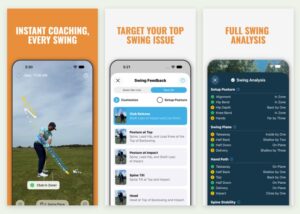 | Swing Coach | Spoken feedback after every swing on the faults you choose to work on. iPhone and iPad only. | App Store |
Best for Video Analysis & Lessons
| V1 Golf | Slow motion, drawing tools and a large pro swing library, plus online lessons from real coaches. | App StoreGoogle Play |
Best 3D Swing Analysis
| Sportsbox 3D Golf | Turns one phone video into a 3D model and measures how your body turns, tilts and sways. | App Store |
Best Hands-Free Recording
| Swing Profile | Records, trims and replays every swing automatically, with swing plane lines drawn for you. | App StoreGoogle Play |
Best for Working With a Coach
| OnForm | Send swing videos to your coach and get voice-over feedback back, free if your coach subscribes. | App StoreGoogle Play |
Best Live Swing Mirror
| Mirror Vision | Streams your swing live from an iPhone to an iPad at your feet, so you see it as you swing. | App Store |
Golf Swing Analysis Apps Compared
Here is how the seven apps compare on what you get for free, what the paid plans cost in the US, and which phones they run on. Prices are list prices for each app’s entry-level paid plan.
| App | Best for | Analysis | Free version | Paid from (US) | Works on |
|---|---|---|---|---|---|
| GolfFix | Best overall and best free | AI coaching | AI swing analysis, with ads and limited swing history | $14.99/mo or $99.99/yr | iPhone, iPad, Android iOS 16 or later |
| Swing Coach | Spoken feedback after every swing | AI coaching | Free trial | $14.99/mo or $119.99/yr | iPhone, iPad iOS 26 or later; no Android |
| V1 Golf | Video analysis and online lessons | Video review | Record, play back frame by frame and send videos to a coach | $9.99/mo or $79.99/yr | iPhone, iPad, Android iOS 16 or later |
| Sportsbox 3D Golf | 3D swing measurement | 3D analysis | 5 swings a month | $15.99/mo or $109.99/yr | iPhone, iPad, Android iOS 17 or later; iPhone recommended |
| Swing Profile | Hands-free recording | Video review | Your 3 latest recordings and 5 Auto Replay sessions an hour | $7.99/mo or $79.99/yr | iPhone, iPad, Mac, Android iOS 15 or later |
| OnForm | Working with a coach | Video coaching | Free if your coach subscribes | $9.99/mo or $99.99/yr | iPhone, iPad, Android iOS 18.6 or later; Android has fewer features |
| Mirror Vision | Seeing your swing live | Live video mirror | One 10-minute mirroring session a day | $9.99/mo or $49.99/yr | iPhone with iPad or Mac Needs two Apple devices; no Android |
The 7 Best Golf Swing Analysis Apps 2026
1. GolfFix: Best Overall and Best Free Golf Swing Analyzer App
Pros:
- Free version still runs the AI swing analysis
- Flags more than 45 swing faults and explains each one
- Compares your swing with a pro’s or with your own past swings
- Analyzes imported videos as well as live recordings
- Works on iPhone, iPad and Android
Cons:
- Accurate results depend on careful camera placement
- Scores can vary from one swing to the next
- Free version has ads and a limited swing history
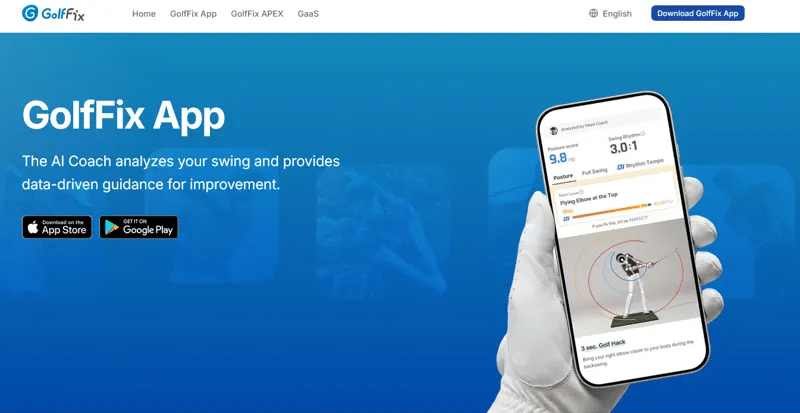
GolfFix is the best golf swing analysis app for most golfers because it does the hardest part for you. It records your swing from address to finish, finds what is going wrong and tells you what to work on, and the free version still runs that AI analysis. It works on iPhone, iPad and Android, which makes it the easiest recommendation on this list.
I was wary of the “AI analysis” claims at first. But after about 30 minutes of testing in my backyard with a Samsung S22 Ultra, I was genuinely taken aback. The feedback came back quickly and clearly, and it pointed out details in my swing that I had previously overlooked.
GolfFix checks for more than 45 swing faults and pairs each one with an explanation, a fix and a visual example. You can compare your swing with a pro’s or with your own past swings, and import videos from your camera roll to look at a lesson or a round later. On the paid plan, shot-fix lessons start from the miss you are fighting, such as a slice, hook, fat shot or shank, and work back to the move that causes it.
Camera placement is key. During my sessions, I discovered that getting the phone at the correct height and angle made a big difference to the accuracy of the analysis. Set your camera up carefully, and the results are far more reliable. We cover the right setup in our recording guide below.
Like every AI swing app, GolfFix is better at spotting positions than judging whether they matter for your game. Scores can move from one swing to the next, and some golfers find it flags faults a coach would let go. Treat it as a second pair of eyes rather than the final word.
The free version runs the AI analysis with ads and keeps a limited swing history. The Advanced Plan costs $14.99 a month or $99.99 a year in the US and adds the advanced AI analysis, shot-fix lessons, monthly progress reports, rhythm, tempo and focus drill modes, unlimited swing history and no ads. Most golfers can start free and upgrade once they practice every week.
Works on: iPhone and iPad (iOS 16 or later) and Android.
2. Swing Coach: Best Real-Time AI Golf Swing Coach App
Pros:
- Spoken feedback right after every swing
- You choose which part of your swing to work on
- Tracks your body and the clubhead from one phone
- Works offline, indoors or out, with or without a ball
- Checks your setup posture as well as the swing
Cons:
- iPhone and iPad only, on iOS 26 or later
- Works best on an iPhone 14 Pro or newer
- No Android version
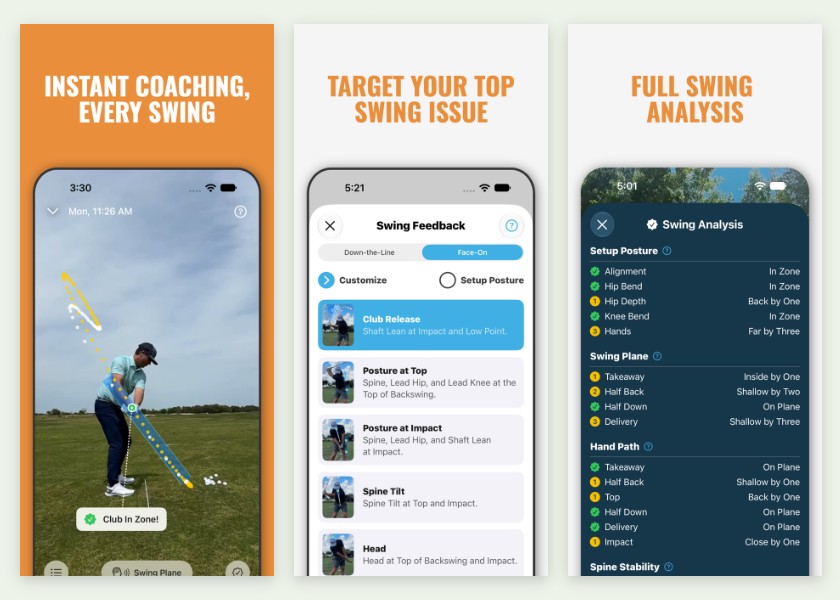
Swing Coach is designed to work like a coach standing next to you on the range. Instead of handing you a report after the session, it speaks to you right after each swing, so you can make a change and check it on the very next ball.
You start by telling it what you are working on. Swing Coach measures areas such as swing plane, hand path, hip depth, spine stability, a flying elbow and shoulder plane, then tells you how that swing measured up. It tracks your body and the clubhead from your phone’s camera, with no sensors or markers, and it checks your setup posture before you swing.
The app has grown quickly since it launched in 2025. A 2026 update added face-on analysis alongside the original down-the-line view, and later releases added a low-point measurement and an option to capture only swings where you hit a ball. You can also set it to give feedback only when you turn to the camera and raise your hand. It works indoors or outside, with or without a ball, and day to day it does not need an internet connection.
Its coaching videos come from well-known YouTube instructors, including Danny Maude, Chris Ryan, and Andy Proudman and Piers Ward of Me and My Golf. That is useful when you need a drill for a fault, but it also means some of the YouTube videos praising Swing Coach come from its own partner coaches rather than independent reviewers.
The catch is hardware. Swing Coach runs only on iPhone and iPad with iOS 26 or later, and the developer says an iPhone 14 Pro or newer gives its AI the best picture. Android development is paused, so Android golfers should look at GolfFix instead.
You can try Swing Coach free before you subscribe. After that, it costs $14.99 a month or $119.99 a year in the US.
We haven’t had Swing Coach on the range yet. We added it through in-depth research and our experience evaluating golf equipment, and we will update this review once we have.
Works on: iPhone and iPad (iOS 26 or later). No Android version.
3. V1 Golf: Best for Video Analysis and Online Lessons
Pros:
- Slow motion with frame-by-frame playback and drawing tools
- Large library of PGA Tour, LIV and LPGA model swings
- Ball Tracing on the top plan, with no radar needed
- Online lessons and coaching from real instructors
- Hands-free capture by saying “V1 Start”
Cons:
- Drawing, Compare and Overlay tools need a subscription
- Does not diagnose faults for you like an AI coaching app
- Lessons with a coach cost extra

V1 Golf has been a reference point for golf swing video analysis for years, and it is the best app here if you want to study your swing on video or work with a coach online. It does not diagnose faults for you the way GolfFix or Swing Coach does, but its video tools and coaching network are hard to beat.
The core of V1 is slow-motion video. When I used V1 at Pilar, I recorded my swing in slow motion and then used the playback and drawing tools to break it down frame by frame. Seeing each position frozen on screen, with a line drawn up the shaft, showed me faults I had only been guessing at before.
I also liked the model swing library. You can line your swing up next to a tour pro, frame for frame, and see exactly where your positions differ at the top or at impact. The library covers PGA Tour, LIV and LPGA players, and for the average golfer that side-by-side view makes swing faults much easier to understand.
The top Advanced V1sion plan adds Ball Tracing, which draws your ball flight from a down-the-line video without a radar, and Skeletal Tracking, which overlays your body positions to show movements loose clothing can hide. V1 also connects to ground pressure sensors, and you can start a recording hands-free by saying “V1 Start.”
V1’s biggest strength is its coaching network. You can send swings to your own instructor, or sign up for lessons or a coaching membership with a V1 coach and get voice-over analysis, drills, chat and video calls. New golfers can try a free QuickFix review. Lessons and memberships are priced separately.
The free version records and imports swings, plays them back frame by frame and lets you send videos to a coach. Drawing tools, Compare and Overlay, and the HD model swing library need V1 Golf Plus, at $9.99 a month or $79.99 a year in the US. Advanced V1sion costs $14.99 a month or $119.99 a year and comes with a free trial.
For a refresher on the fundamentals, read our guide to how to swing a golf club.
Works on: iPhone and iPad (iOS 16 or later) and Android.
4. Sportsbox 3D Golf: Best 3D Golf Swing Analysis App
Pros:
- Builds a 3D model of your swing from one phone video
- Measures turn, tilt, sway and side bend in numbers
- Compares your positions with ranges from elite golfers
- Free plan includes five swings a month
- Strong tools for coaches who share data with students
Cons:
- The amount of data can overwhelm beginners
- Imported videos give less complete data than swings captured in the app
- Google Play reviews report capture and upload problems on Android

Sportsbox 3D Golf offers the most detailed analysis of any app on this list. Instead of only showing you a flat video, it turns a single swing video into a 3D model of your body that you can rotate and view from angles you never filmed, including from above.
It measures rather than just shows. Sportsbox reports movements such as sway, turn, tilt and side bend through the swing and compares them with reference ranges from elite golfers, so you can see whether your hips sway or how much your chest has turned. You can set goals, then use Practice Mode to have your numbers read out to you between shots.
Recent updates added a Diagnose tab with swing-flaw and speed assessments, a Swing Score assessment on every plan including the free one, 3D overlays for comparing two swings, and a beta AI assistant called SAMI that answers preset questions about your data. Sportsbox also connects to Foresight launch monitors.
Sportsbox started as a tool for golf instructors, and many coaches use it to set target ranges for their students. If your coach already uses it, you will get the most from it. If you practice alone, pick one number and track it, rather than trying to fix everything at once. High handicappers can easily drown in data, and a measurement alone won’t tell you how to fix it.
In April 2026, a group led by Bryson DeChambeau acquired Sportsbox, so his public praise for the app comes from an owner.
Sportsbox is built for iPhone and iPad. There is an Android version, but its Google Play reviews describe capture and upload problems, so we recommend it on iPhone. It also works best with swings you record in the app, because imported videos give less complete data.
The free plan covers five swings a month. 3D Player costs $15.99 a month or $109.99 a year in the US, 3D Player Plus is $39.95 a month or $399.99 a year, and the 3D Pro plan for coaches is $79.99 a month or $799.99 a year.
Works on: iPhone and iPad (iOS 17 or later). An Android version is available, but we recommend iPhone.
5. Swing Profile: Best Hands-Free Recording App
Pros:
- Records, trims and replays every swing hands-free
- Draws swing plane and reference lines automatically
- Tracks ball flight and flags head and spine sway
- Syncs two swings side by side automatically
- Lowest monthly price in this guide
Cons:
- Free version keeps only your three latest recordings
- Elite’s cloud storage is capped at 5GB
- Fewer coaching and drill features than the AI apps

Swing Profile is the best golf swing app for practicing without touching your phone between shots. You set the phone up, hit balls, and the app captures each swing, trims it to the two seconds that matter and plays it back in slow motion before you reach for the next ball.
Several apps here can detect a swing automatically, but Swing Profile takes the hands-free idea furthest. It trims, replays and marks up every swing without a tap, so you stay in your practice rhythm instead of walking back to your phone after every shot.
It also does much of the drawing for you. Swing Profile adds swing plane and reference lines automatically, tracks your ball flight, flags head and spine sway, and builds a sequence of your key positions. It can sync any two swings side by side, and on iPad it can record from a second, external camera at the same time.
When I tested it, I found the free plan was enough to analyze my swing thoroughly, but it is worth knowing where it stops. The free version keeps only your three latest recordings, with five Auto Replay sessions an hour and five voiceovers a month.
Swing Profile was recently rebuilt from the ground up, adding automatic sway detection and hand gestures for marking videos.
Elite costs $7.99 a month or $79.99 a year in the US, and every paid plan starts with a 7-day free trial. Elite removes the limits on auto capture and replay, adds 30 voiceovers a month and backs your swings up to the cloud with 5GB of video storage. Coach ($15.99 a month or $159.99 a year) and School plans are built for instructors.
Works on: iPhone and iPad (iOS 15 or later), Apple silicon Macs and Android.
6. OnForm: Best Golf Swing Analysis App for Working With a Coach
Pros:
- Built for sharing swing videos and feedback with a coach
- Free for golfers whose coach subscribes
- Records up to 240 fps from multiple angles
- 3D swing analysis and skeleton tracking on iPhone
- Pulls shot data from the Garmin R10 and Full Swing KIT
Cons:
- The whole app now needs iOS 18.6 or later
- The Android version leaves out several key features
- Golfers practicing alone get less from it than from GolfFix or V1

OnForm is a video coaching platform first and a swing analysis app second. That makes it the best choice on our list if you already work with a golf coach or plan to start.
Your coach can send feedback through voice-overs, markup, messages and videos of themselves explaining the fix, and many coaches use it to run remote lessons. If your coach subscribes, you use OnForm with them at no extra cost.
The recording side is strong too. OnForm records high-speed video at up to 240 fps on supported devices, from multiple angles or external cameras. It detects golf swings automatically, and you can start recording with a Bluetooth trigger or the OnForm Apple Watch app. You can compare two videos side by side or overlaid.
For golf, it adds 3D swing analysis and skeleton tracking, and it pulls swing metrics and shot data from the Garmin R10 and Full Swing KIT launch monitors. That is a smart pairing if you already own one of the best golf launch monitors.
The whole app now needs iOS 18.6 or later, so older iPhones are left out. There is an Android app, but it leaves out the 3D analysis, skeleton tracking, launch monitor support and automatic swing detection. And because OnForm is built around coaching, golfers practicing on their own may find GolfFix or V1 Golf more useful day to day.
Golfers training on their own can choose the Standard plan at $9.99 a month or $99.99 a year, or the fully featured Premium plan at $14.99 a month or $149.99 a year in the US. Quarterly billing is also available, and OnForm offers a 14-day free trial with no credit card required. Coach plans run from $19.99 to $59.99 a month.
Works on: iPhone and iPad (iOS 18.6 or later), with an Apple Watch app for starting recordings. Android version available with fewer features.
7. Mirror Vision: Best Live Swing Mirror App
Pros:
- Shows your swing live on an iPad at your feet
- Draw lines, boxes and angles on the live view
- Records up to 240 fps with frame-by-frame review
- Auto-detects swings and keeps only the swing
- Devices connect directly, with no Wi-Fi needed
Cons:
- Needs two Apple devices, ideally an iPhone and an iPad
- No Android version
- Connection problems are a recurring complaint in reviews

Mirror Vision works like a mirror on the driving range. Your iPhone films you while your iPad sits on the ground by the ball and shows the swing live, so you can watch your own backswing happen without lifting your head out of posture.
That live view is the point. You can set up down the line, face on or from behind, then draw lines, boxes, arrows, circles and angles directly on the live picture and swing into them. It is a fast way to check a takeaway or top-of-swing position while the feel is still fresh.
It records too. Auto-detect captures only the swing, recordings go up to 240 fps for slow motion, and you can jump straight to address, the top, impact or the finish. Raise your palm to keep a clip, or do nothing and it is discarded. You can export clips with your lines on them to send to a coach.
The two devices connect directly, so you do not need Wi-Fi or mobile data. A second iPhone or an Apple silicon Mac can stand in as the viewer if you don’t have an iPad.
The downsides are the setup and reliability. You need two Apple devices, and there is no Android version. Connection drops between the devices are a recurring complaint in reviews. A 2026 update rebuilt the connection and streaming to fix that, but check that it works with your devices on the free version before you pay.
The free version gives you one 10-minute mirroring session a day. Mirror Vision Pro costs $9.99 a month or $49.99 a year in the US. It removes the time limit and adds automatic replay on the second device. The developer’s App Store listing and its website disagree on whether swing auto-detect, gesture controls, cloud sync and 240 fps recording are free or Pro-only, so check those in the free version before you pay.
For the recording side, see our guide to the best cameras to record your swing.
Works on: iPhone, with an iPad or Apple silicon Mac as the viewer (iOS 16.6 or later). No Android version.
Other Golf Swing Apps Worth Knowing
These apps didn’t make our main list, but each is worth a look for a specific need.
- 18Birdies AI Swing Analyzer: a feature inside the 18Birdies golf GPS app that rates your swing, picks out your biggest flaw and suggests drills. It needs an 18Birdies Premium subscription, so it makes most sense if you already use 18Birdies on the course.
- Mustard Golf: an iPhone-first app that analyzes a swing you upload and builds a drill plan, with coaching content from Justin Rose and instructors including Mark Blackburn and Michael Jacobs. Golf Digest is an investor in the company.
- CoachNow: a coaching platform, similar to OnForm, for sharing swing videos and feedback with an instructor. Its Analyze plan costs $9.99 a month or $59.99 a year in the US.
- Sparrow: an iPhone app with automatic AI swing detection. It hasn’t been updated since November 2025, so we would try GolfFix or Swing Coach first.
How We Chose These Apps
GolfSpan is independent and not pressured by app developers to recommend products. We were not paid for the reviews in this article. We may earn an affiliate commission when you purchase something through our links.
These apps were reviewed by Matt Callcott-Stevens, a 10.8 handicap golfer who plays weekly at Pilar Golf Course near his home in Buenos Aires, Argentina. Matt used the apps on the range at Pilar. Fellow team member Abdul tested them near his home in Karachi, Pakistan, and captured the screenshots in this guide. We then compared notes, and an editor fact-checked the list before publishing.
Three apps on this list haven’t been through that range testing yet: Swing Coach, Sportsbox 3D Golf and OnForm. We included them based on in-depth research into their current features, prices and device requirements, and our experience evaluating golf equipment. We’ll update their reviews once we’ve tested them.
We only considered apps that are currently available and supported, and we judged each one on these criteria:
- Analysis quality: how clearly the app shows or explains what is happening in your swing.
- Accuracy: how reliable its measurements and fault calls are, and how much they depend on camera setup.
- Ease of use: how quickly you can set up, record a swing and get feedback during a practice session.
- Platform support: whether it runs on iPhone, iPad and Android, and which phones it needs.
- Free version: how much you can do before you pay.
- Cost: the price of the plan that unlocks the features most golfers will want.
- Active development: whether the developer has updated the app in the last 12 months. Apps that have stopped getting updates fall behind new phones and new operating systems.
App prices change often and vary by country, so check the App Store or Google Play for the current price where you live.
What To Look For in a Golf Swing Analyzer App
Choosing a golf swing analysis app comes down to one question: what kind of feedback do you need? Some golfers just want to see their swing, while others want an app to tell them exactly what is going wrong.
It helps to understand the main differences, so you can match an app to your game, your phone and your budget. We will take you through each factor below.
Type of Analysis
Swing analysis apps fall into three broad groups:
- Video review apps
- AI coaching apps
- 3D analysis apps
Video review apps, like V1 Golf, Swing Profile and Mirror Vision, record your swing and give you slow motion, drawing tools and pro comparisons. You do the analysis yourself, or send the video to a coach.
AI coaching apps watch your swing and tell you what to fix, which makes them the best choice if you are not sure what to look for yet. They work in two ways. Swing Coach speaks to you right after each swing, so you can try a change on the next ball. GolfFix analyzes each recorded swing and pairs the faults it finds with drills, so you can review as you go or after the session.
3D analysis apps, like Sportsbox 3D Golf, build a model of your body through the swing and measure it. OnForm offers 3D analysis on iPhone too. They give you the most detail, but the numbers are most useful to golfers who know what they are working on or share the data with a coach.
Phone Camera App or Swing Sensor?
A phone app sees your swing from the outside. It is very good at showing your body and club positions, but it estimates them from the picture rather than measuring them directly, and it cannot tell you ball speed, spin, launch angle or carry distance.
That is where hardware takes over. A swing sensor that clips to your club or sits on your wrist measures the motion itself, such as tempo, clubhead speed or wrist angles, depending on the device. A launch monitor measures what the ball does. Start with an app if you want to see and fix your positions. Choose one of the best golf swing analyzers if you want hard numbers on one part of your swing, or one of the best golf launch monitors if you want to know how far and how straight you hit it.
How Much To Trust the AI
AI swing analysis is better at showing you what your body did than at telling you what to do about it. Swing scores are the weakest part: golfers regularly report a score that contradicts the shot they just hit, and the apps have no way of knowing whether a limited shoulder turn is a fault or an old injury. Scores can also change noticeably between two swings that felt the same, so look for a trend across a session rather than reacting to a single number. Teaching professionals raise a second, subtler problem. Golfers practicing with an app tend to exaggerate and slow their motion to satisfy it, so the swing being measured stops being the swing they actually play with.
The approach that holds up is to film, review, pick one thing, then put the phone down and hit balls. Use the app as a reality check between sessions rather than a coach standing over every swing.
Accuracy, Camera Setup and Frame Rate
An app is only as accurate as the video you give it. AI and 3D apps track your body from the camera image, so a phone placed too low, too close or off your target line can produce misleading feedback.
Use a tripod or phone holder, keep the camera still, and film in good light. Then check the frame rate. The golf swing happens too fast to judge at normal speed, and most modern phones record slow motion at 120 or 240 frames per second, which is enough to see your positions clearly through impact. Make sure the app can record in slow motion itself, or that it can import slow-motion clips you film with your phone’s camera. Our recording guide below covers camera height, distance and angles.
iPhone or Android
Every app on this list runs on iPhone. GolfFix, V1 Golf and Swing Profile also have full Android apps. OnForm has an Android app, but its 3D analysis and several other key features are iPhone-only. Sportsbox 3D Golf has an Android version too, but its Google Play reviews describe capture and upload problems, so we recommend it on iPhone. Swing Coach and Mirror Vision are Apple-only.
Check Your Phone Before You Subscribe
An app can be on the App Store and still not run well on your phone, and the newest AI features need recent hardware. Swing Coach needs iOS 26 and works best on an iPhone 14 Pro or newer. OnForm needs iOS 18.6, Sportsbox needs iOS 17, and GolfFix and V1 Golf need iOS 16. Mirror Vision needs two Apple devices: an iPhone to film and an iPad or Apple silicon Mac to watch. Check the compatibility section of the App Store or Google Play listing, then try the free version or trial on the phone you will actually use before you pay for a year.
The Best Golf Swing App for iPhone
iPhone owners get the widest choice. GolfFix is the pick for most golfers, because its free AI analysis tells you what to fix. If you have a recent iPhone on iOS 26, Swing Coach gives you spoken feedback after every swing. V1 Golf is the best choice for video review and online lessons, and Sportsbox 3D Golf is the strongest 3D analysis app here, built first for iPhone. If you own an iPad as well, Mirror Vision turns the pair into a live swing mirror.
The Best Golf Swing App for Android
Android owners have a shorter list, so it is worth checking before you get attached to an app. GolfFix is the strongest Android choice, with its AI fault detection and free version available on Android too. V1 Golf and Swing Profile both have full Android apps too. OnForm runs on Android, but with fewer features than on iPhone. Sportsbox has an Android version, but it is less reliable than the iPhone app, and Swing Coach and Mirror Vision have no Android version at all. Slow-motion capture also varies more between Android phones, so check what yours can record. For more options, see our guide to the best golf apps for Android.
Free vs Paid Features
Every app on this list is free to download, but the most useful features usually sit behind a subscription, and the free versions differ far more than the shared price of zero suggests:
- GolfFix: AI swing analysis, with ads and a limited swing history.
- Swing Coach: a free trial, then a subscription.
- V1 Golf: record, import and play back frame by frame, and send videos to a coach. Drawing and comparison tools are paid.
- Sportsbox 3D Golf: five swings a month.
- Swing Profile: your three latest recordings and five Auto Replay sessions an hour.
- OnForm: free if your coach subscribes.
- Mirror Vision: one 10-minute mirroring session a day.
Paid plans are inexpensive compared with regular lessons. The main player plans in this guide cost between $49.99 a year (Mirror Vision Pro) and $119.99 a year (Swing Coach) in the US, and paying yearly saves roughly 17% to 58% compared with paying monthly. Even so, start with the free version or a single month. An app may not suit your phone, your practice space or the way you like to practice, and that is cheaper to learn before you commit to a year. If you only practice a few times a month, a free plan from GolfFix or Swing Profile may be all you need.
Coach Connection, Drills and Progress Tracking
If you take lessons, choose an app your coach already uses. V1 Golf and OnForm let you send videos to an instructor and get voice-over lessons back, which keeps you on track between sessions. V1 also offers lessons and coaching memberships with its own coaches if you don’t have one.
Spotting a fault is only half the job. The best apps link your faults to drills and track your progress over time, like GolfFix’s shot-fix lessons and monthly reports, Swing Coach’s coaching videos, and Sportsbox’s goals and Practice Mode. Look for an app that saves your swing history, so you can see whether a change is actually sticking.
How To Record Your Golf Swing for a Swing Analysis App
The best way to record your golf swing is to film it from two angles, face-on and down-the-line, with your phone held still on a tripod or mount at roughly hand height. Get this right, and every app on this list gives you more accurate feedback.
Face-On
Set the phone directly in front of you, facing your chest, with the camera lined up with the middle of your stance. This angle shows your weight shift, hip sway, head movement and ball position.
Down-the-Line
Place the phone behind you, pointing at your target, roughly in line with your hands. This angle shows your posture, swing plane and club path, including whether you come over the top.
Recording on Your Own
You don’t need a friend to film you. All you need is a steady way to hold your phone and an app that records without you touching it.
A tripod works well, but I have found it inconvenient to carry around the range. A phone holder that attaches to an alignment stick, like the SelfieGOLF Record Golf Swing, is easier to set up and fits in your golf bag. For more recording options, see our guide to the best cameras to record your swing.
Most of the apps in this guide can also capture your swing hands-free, so you can hit ball after ball without walking back to your phone:
- Automatic capture: GolfFix, Swing Profile, Mirror Vision and OnForm detect your swing and save just the swing.
- Voice: in V1 Golf, say “V1 Start” to begin recording.
- Hand signals: Swing Coach can wait to give feedback until you turn to the camera and raise your hand, and Mirror Vision keeps a clip when you raise your palm.
- Remote triggers: OnForm can start recording from a Bluetooth trigger or its Apple Watch app.
Setup Tips
- Keep the camera still on a tripod or phone mount
- Fit your whole body and the club in the frame, from address to finish
- Record in slow motion, ideally at 120 or 240 frames per second (fps), if your phone and app support it
- Film in good light, and avoid pointing the camera into the sun
- Follow the app’s own camera setup instructions, because AI and 3D apps expect a specific angle and distance and are less accurate when the phone is somewhere else
- Put the camera in the same spot every session, so you compare like with like
Best Golf Swing Analysis Apps 2026 FAQs
What Is the Best Golf Swing Analysis App?
GolfFix is the best golf swing analysis app for most golfers. Its free version still runs the AI analysis that spots common swing faults and suggests drills to fix them, and it works on iPhone, iPad and Android. The Advanced Plan ($14.99 a month or $99.99 a year in the US) adds shot-fix lessons, monthly progress reports and unlimited swing history. If you’d rather study your own video or work with a coach, V1 Golf is the better choice.
What Is the Best Free Golf Swing Analyzer App?
GolfFix is the best free golf swing analyzer app, and the best free AI option, because its free version still runs the AI analysis that spots common faults, though it carries ads and keeps a limited swing history. Swing Profile is the best free option for hands-free recording, but it only keeps your three most recent clips. Sportsbox 3D Golf’s free plan covers five 3D swings a month, and V1 Golf’s free version records and plays back frame by frame, but its drawing tools are paid.
Can AI Analyze My Golf Swing?
Yes, AI can analyze your golf swing. AI golf swing analyzer apps like GolfFix, Swing Coach and Sportsbox 3D Golf track your body through the swing from a phone video and flag common faults. AI analysis is most accurate when your camera is set up correctly, and it works best alongside practice or lessons rather than as a replacement for a coach. It is also worth knowing the limits: golfers regularly report swing scores that do not match their ball flight, and the apps cannot see physical limitations, so an older golfer may be told to fix a shoulder turn their body will not make.
Can ChatGPT or Gemini Analyze My Golf Swing?
You can upload a swing video to ChatGPT or Gemini and get feedback, and plenty of golfers do. Opinions are split on how good it is. Some find the explanations clearer and more patient than a lesson, while others report it inventing faults or contradicting itself between videos. In one published test, Gemini flagged three faults in a sound swing after being asked for tips. A general chatbot has no swing-specific tracking, so it is working from the same video you can watch yourself. Treat it as a second opinion, or use it to talk through a swing idea, rather than as a diagnosis.
What Is the Best Golf Swing Coach App?
It depends on whether you want an AI coach or a human one. Swing Coach is the best AI golf swing coach app: it speaks to you after every swing about the part of your swing you chose to work on, but it needs an iPhone or iPad on iOS 26. On Android, GolfFix is the closest alternative. If you want feedback from a real instructor, V1 Golf and OnForm let you send swing videos to a coach and get voice-over lessons back, and V1 can match you with one of its own coaches.
What AI App Does Bryson DeChambeau Use?
Bryson DeChambeau is closely tied to Sportsbox AI, the company behind Sportsbox 3D Golf. He began using its tools in 2024, and in April 2026 he led the investor group that bought the company, so he is an owner as well as a user. Sportsbox’s AI assistant, SAMI, is built on Google’s Gemini models. DeChambeau has also said he talks swing problems through with Gemini itself, including during a LIV Golf event in South Korea in 2026.
What Is the Best Golf Swing Analysis App for iPhone?
For most golfers, GolfFix is the best golf swing analysis app for iPhone, thanks to its free AI analysis. If you have a recent iPhone on iOS 26, Swing Coach gives you spoken feedback after every swing. iPhone owners also get the strongest versions of Sportsbox 3D Golf and OnForm, and Apple-only apps like Mirror Vision. Check the minimum iOS version before you subscribe: Swing Coach needs iOS 26 and OnForm needs iOS 18.6.
What Is the Best Golf Swing Analysis App for Android?
GolfFix is the best golf swing analysis app for Android, thanks to its AI analysis and useful free version. V1 Golf and Swing Profile also run on Android if you want video review tools instead. Be aware that Android versions are often thinner: OnForm’s Android app leaves out the 3D analysis, skeleton tracking and launch monitor support, Sportsbox 3D Golf’s Android version is less reliable than its iPhone app, and Swing Coach and Mirror Vision have no Android version at all.
Can a Golf Swing App Measure My Swing Speed?
Not reliably. The apps on this list analyze how you move, not how fast the clubhead travels or how far the ball carries. A few newer apps claim to estimate clubhead and ball speed from high-frame-rate video, but we haven’t found published accuracy data to back those claims up. If swing speed is what you care about, a launch monitor or a dedicated speed radar is the honest answer.
Do Golf Swing Analysis Apps Actually Work?
They are genuinely useful for seeing what your swing is doing, which many golfers have never properly done. The caveat teaching professionals raise is about using them while you practice: golfers tend to exaggerate and slow their motion to satisfy the app, so the swing it measures stops being the swing they actually make. The more reliable approach is to film, review, pick one thing to work on, then put the phone away and hit balls.
Final Words
GolfFix is the best golf swing analysis app for most golfers, because its free version still tells you what to fix, on both iPhone and Android. If you’d rather study your own video or work with a coach, choose V1 Golf, and if you want your swing measured in 3D, choose Sportsbox 3D Golf.
To narrow it down, start with your phone. Swing Coach needs iOS 26, Mirror Vision needs two Apple devices, and Android owners will get the most from GolfFix, V1 Golf or Swing Profile. Then think about how you practice, whether that is alone on the range, at home or with a coach, and try the free version or a single month before you pay for a year. Whichever app you choose, film from the same angles every session and work on one fault at a time.
Read More:
- Best Golf Swing Analyzers
- Best Golf Launch Monitors
- Best Cameras To Record Your Golf Swing
- Best Golf Apps for Apple Watch
- Best Golf Apps For Android

Matt has played golf since he was 4 years old and has written over 150 articles at GolfSpan since 2021. Matt specializes in product reviews using his postgraduate degree in Sports Marketing from Johan Cruyff Institute. Matt has a handicap index of 10.8 and currently plays weekly at Pilar Golf Course near his home in Buenos Aires, Argentina. He also loves his Callaway Odyssey Exo Rossie putter and likes a pepper steak pie with curry gravy at the turn. You can connect with him on LinkedIn.